Costing & reports
Overheads: how rent and wages reach every mat
Cost categories, the calculation, units, spreading big bills, consumables, and locking the month.
Material cost looks fine but the month ends in a loss?
Log rent, power and wages as expenses under cost categories. Trakto divides each month's total by the mats you make and adds it to every mat. At month-end, Finalize swaps estimates for real bills and locks the month.
1The calculation, step by step
- Take one cost category's expenses for the month (a bill spread over 6 months counts one sixth here).
- Divide by the baseline quantity: the good output of the products ticked on that category, by default the average of the last 3 months.
- That figure per mat (or per kg) is added to every mat's cost, as a line under Direct Costs.
- No bill yet this month for a recurring cost? It shows as ESTIMATE: the average of recent months, until you log the bill or finalise the month.
Rent ₹1,50,000 ÷ 854 mats (average monthly output, Jul–Sep) = ₹175.64 per mat
2Step 1: set up cost categories
WhereCost → Costing → ⚙ Cost Configuration → Cost categories → Overhead
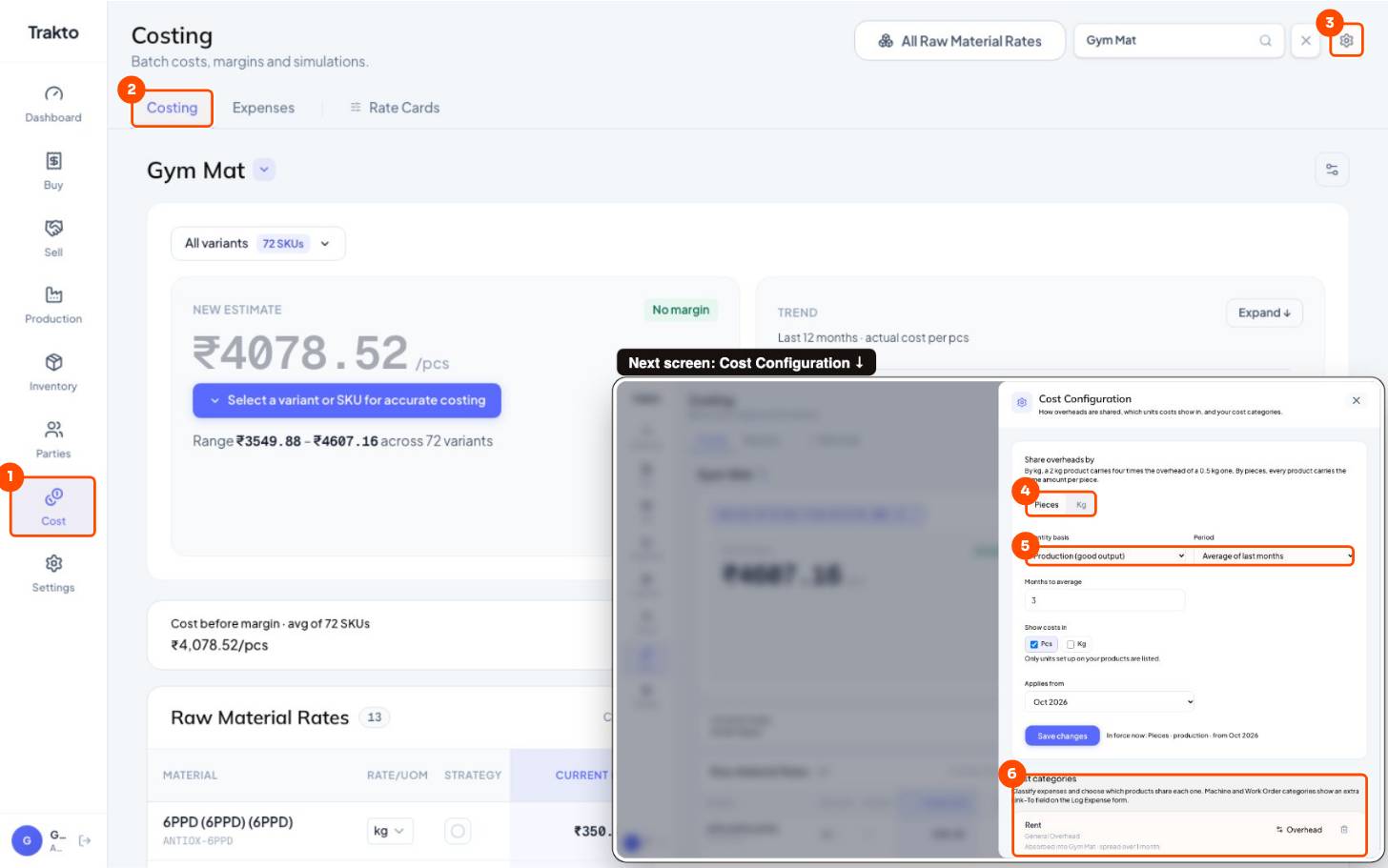
- 1CostIn the left menu.
- 2CostingThe Costing tab.
- 3Settings (⚙)Opens Cost Configuration.
- 4Share overheads byPieces: every mat carries the same. Kg: heavier mats carry more.
- 5Basis and periodGood output, averaged over the last months.
- 6Cost categoriesRent, wages, power … and which products share each.
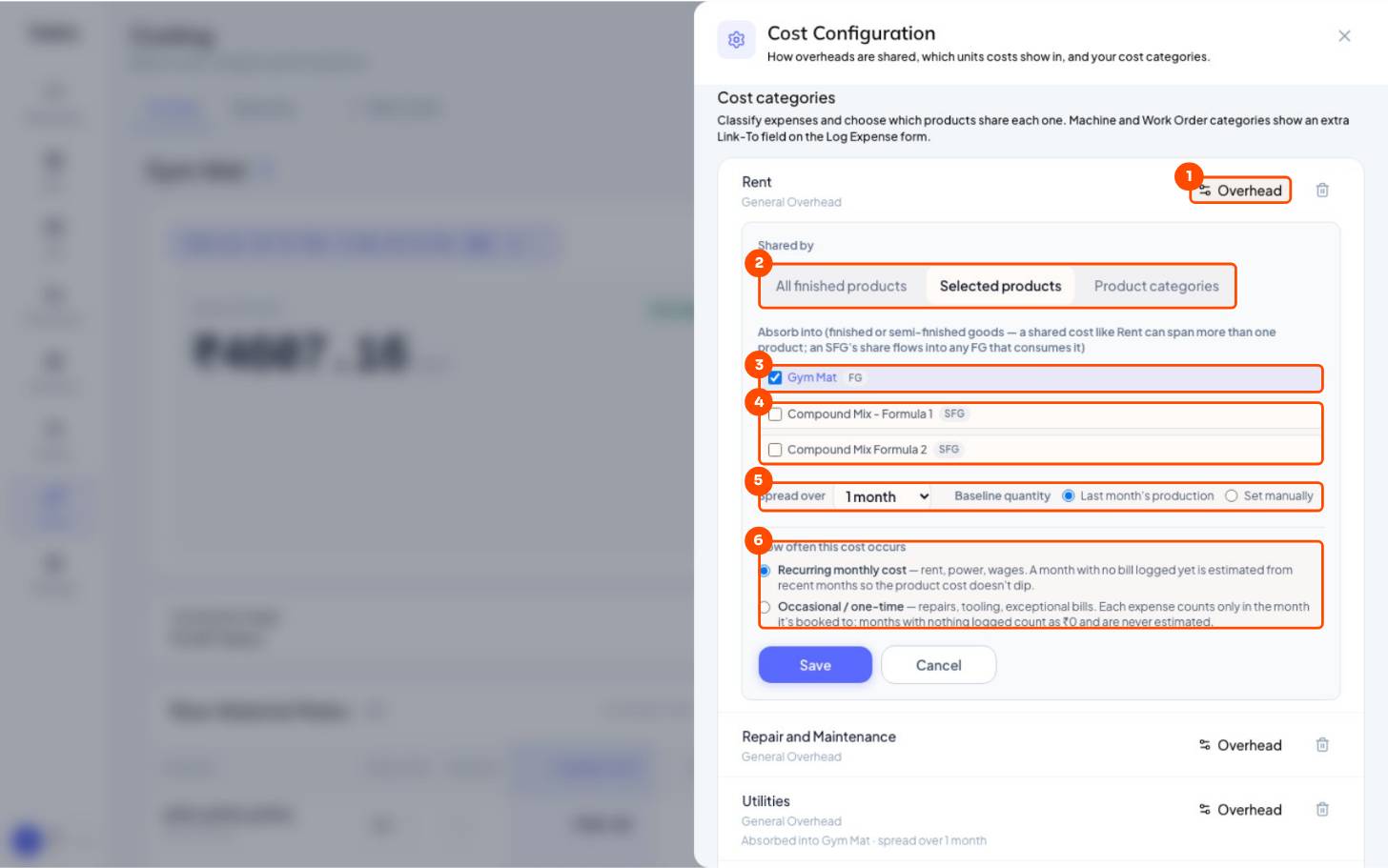
- 1Overhead settingsCost ⚙ → Cost categories → the category's Overhead button.
- 2Shared byAll finished products, selected products, or product categories.
- 3Tick what you sellGym Mat (FG): the overhead lands on the mats you sell.
- 4Leave SFGs untickedThe compound already feeds the mat. Ticking it too sends rent to the mat by two routes and adds kg to pieces.
- 5Spread and baselineSpread a bill over months; divide by last month's production or a quantity you set.
- 6How oftenRecurring: estimated in months with no bill yet. Occasional: only the month it's booked.
Tick only the finished goods you sell. Don't tick a semi-finished good (the compound) that already goes into a mat. The cost should sit on what you sell.
| Rent ₹1,50,000 / month | Tick Gym Mat only (do this) | Tick Gym Mat and the compound |
|---|---|---|
| Divided by | 854 mats | 854 mats + 15,372 kg compound, pieces and kg added together |
| Rate | ₹175.64 per mat | ₹9.24 per mat and ₹9.24 per kg of compound |
| Reaches the mat | Once, directly | Twice: ₹9.24 directly, plus 18 kg × ₹9.24 inside the compound |
| Goes wrong when | — | Compound sits in stock (it holds part of the rent) or output changes: the mat's figure stops adding up |
3Step 2: per piece, per kg, or any unit
| Setting | Choose | When |
|---|---|---|
| Share overheads by | Pieces | Every mat carries the same amount |
| Kg | Heavier mats carry more. Works when every product has a weight in kg: the Weight attribute set to kg, or an alternate kg unit | |
| Quantity basis | Production (good output) | Usual for a factory |
| Sales (dispatched) | When you want cost to follow what you ship | |
| Period | Last month / average of last months / custom | Average of 3 months smooths a slow month |
| Show costs in | Pcs, Kg, m² … | Only units your products are set up with appear, so an 18 mm mat can show ₹ per mat and ₹ per kg |
4Step 3: log expenses, spread big bills
WhereCost → Expenses → Log Expense
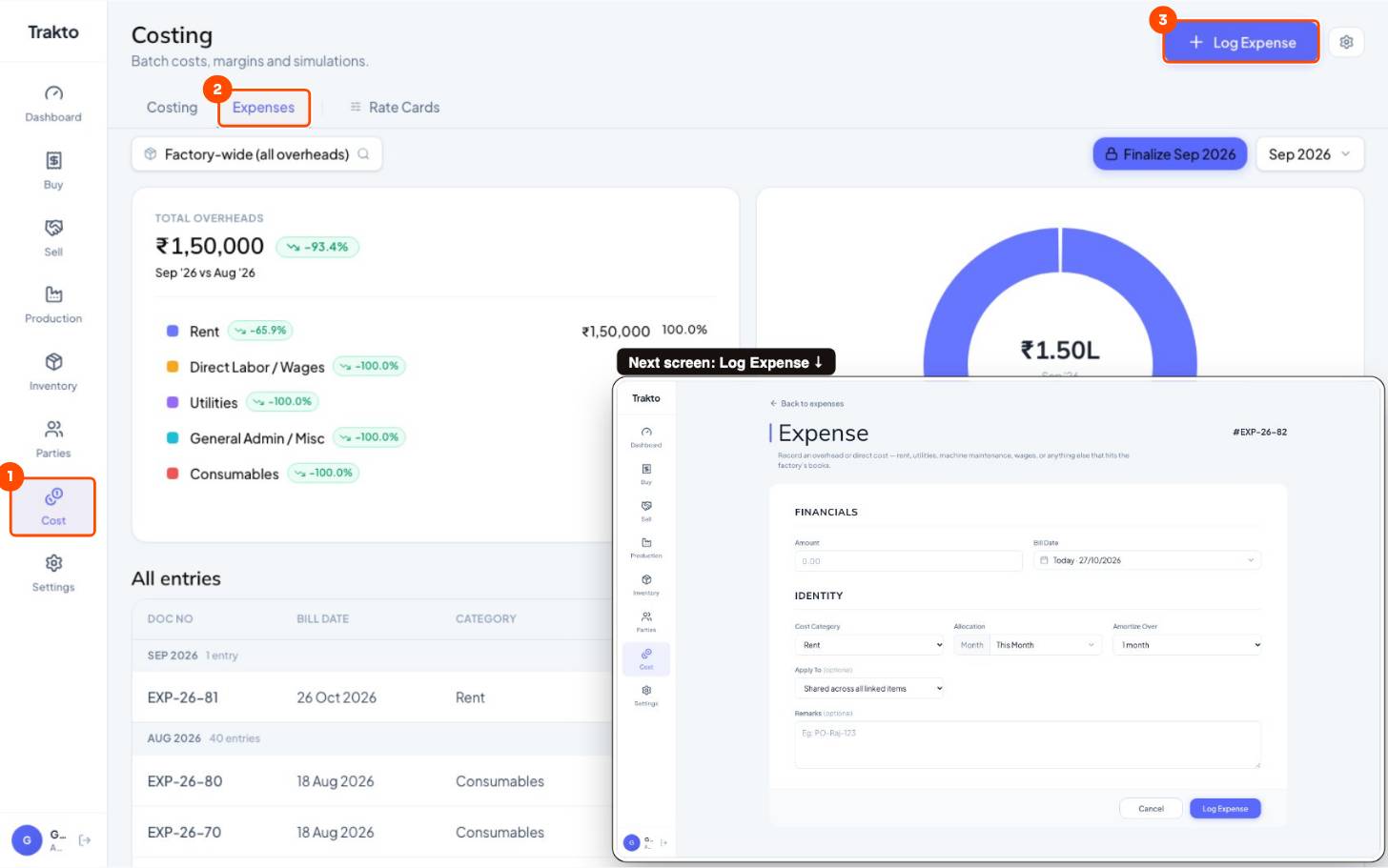
- 1CostIn the left menu.
- 2ExpensesEvery expense by month; Finalize the month here.
- 3Log ExpenseRent, wages, electricity: amount, category and month.
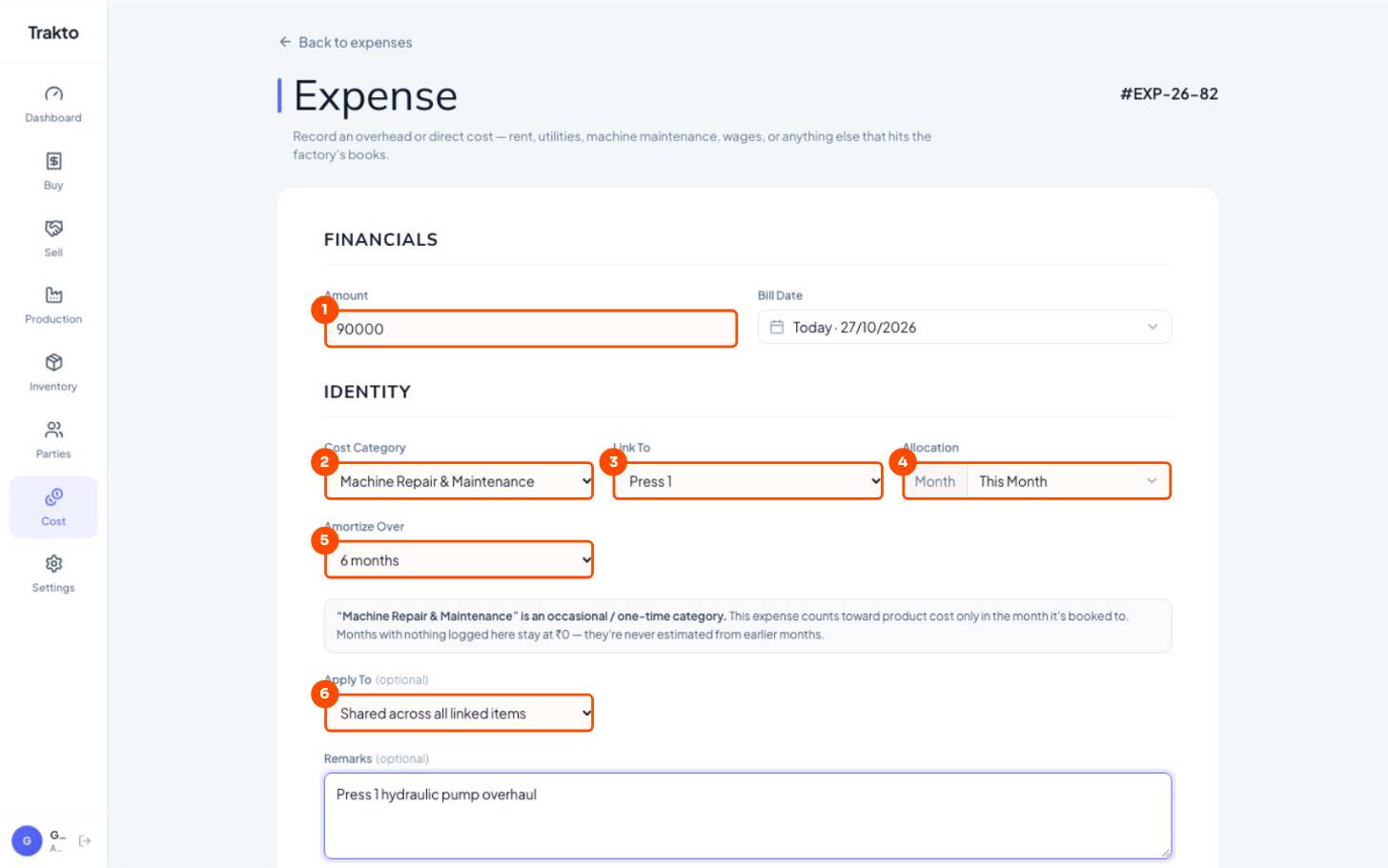
- 1Amount₹90,000 pump overhaul.
- 2Cost categoryDecides which products carry it (set up in Cost Configuration).
- 3Link ToMachine categories ask which machine: Press 1.
- 4MonthThe month the cost belongs to.
- 5Amortize over6 months: ₹15,000 a month, so one big repair doesn't spike one month's cost.
- 6Apply toShared across the category's products, or one product only.
Amortize means spreading one big bill over several months: a ₹90,000 press overhaul over 6 months adds ₹15,000 a month instead of making one month look terrible.
5Consumables and spares from stock
Buy oil, grease or spares through a GRN like any material. When some is used, issue it: Trakto takes it out of stock and logs an expense in that cost category at its stock value, so it flows into overheads by itself.
WhereInventory → Issue Stock → Spares & Consumables
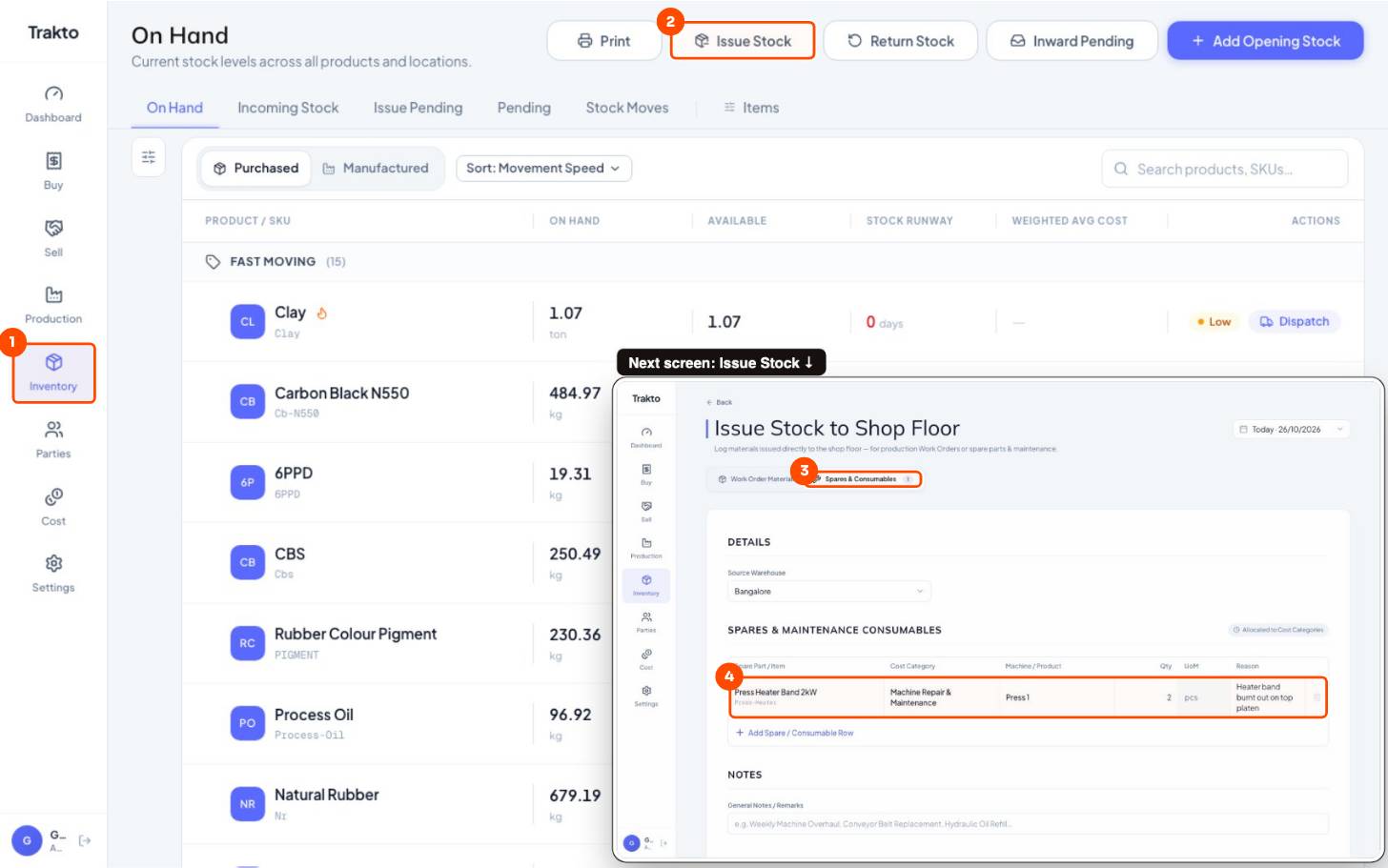
- 1InventoryIn the left menu.
- 2Issue StockTake stock out to the floor.
- 3Spares & ConsumablesNot for a work order: for maintenance or running the factory.
- 4Item, cost category, machine, qtyHere: 2 heater bands to Machine Repair & Maintenance on Press 1. Oil or grease goes to Consumables the same way.
6See what makes up each figure
WhereCost → Costing → Gym Mat → Direct Costs → View entries
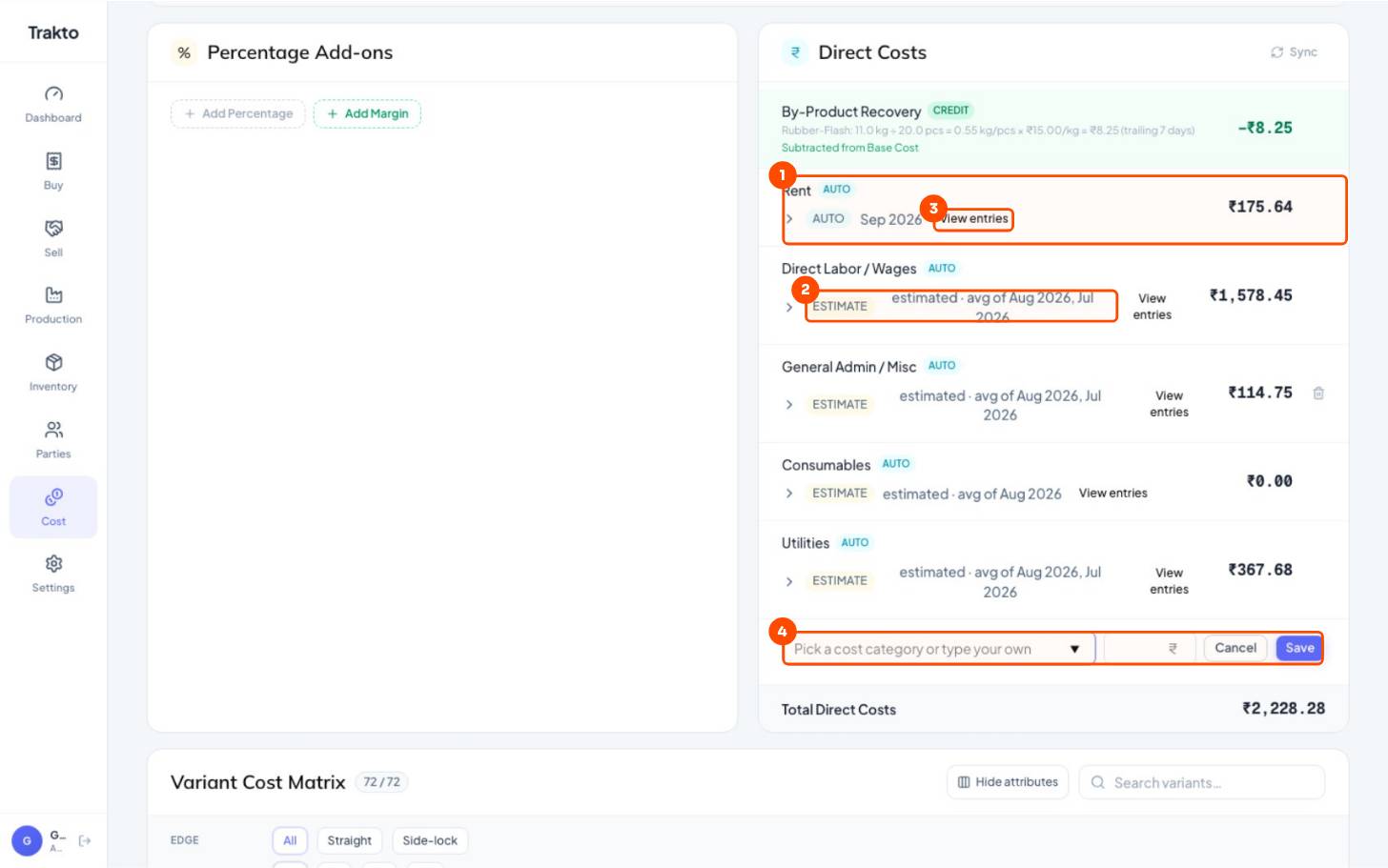
- 1From expenses (AUTO)Each cost category's expenses ÷ the baseline quantity = this figure per mat.
- 2ESTIMATENo bill yet this month: the average of recent months, until you log it or finalise the month.
- 3View entriesOpens the expenses behind the figure.
- 4Add CostType your own line for this estimate: packing, transport, a job-work charge.
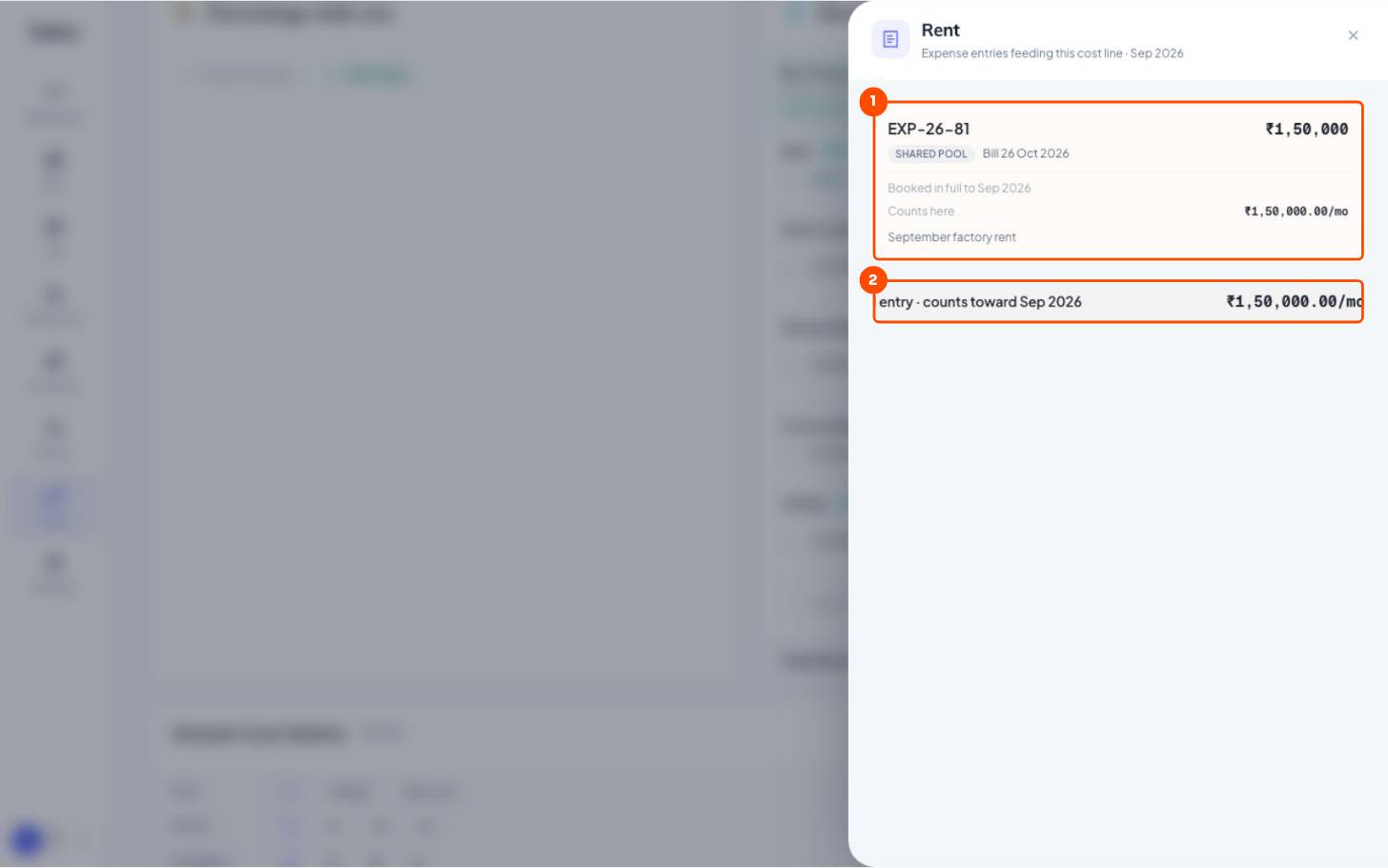
- 1The expenseEXP-26-81, ₹1,50,000 September rent, counted in full to Sep 2026.
- 2Total for the month₹1,50,000 ÷ 854 mats (average good output, Jul–Sep) = ₹175.64 per mat.
7Finalize the month: lock in real overheads
Until a month is finalised, months with missing bills use estimates. Cost → Expenses → Finalize [Month] takes that month's real bills, re-costs its production and every dispatch with them, and locks the month so the numbers stop moving. Your profit reports then use actual overheads, not averages.
Still stuck?
Book a set-up call. We'll configure your compound, variants and machines with you.